Get verified threat intelligence in the AI tools you already use.
Your team already works in Claude, ChatGPT, or Copilot. The Base Operations MCP brings our global threat data into those workflows, so every assessment starts from verified data.
We're selecting 4 security teams to build with us in 2027.
25,000+ global data sources · 5,000+ cities · 99% US coverage · 0.1 mile radius analysis · SOC 2 compliant
AI tools are moving faster than the data supporting their claims.
AI answers from the open web
Ask a general-purpose AI tool how risky an address is and you get a confident guess or a summary of news articles.
Analysts copy, paste, repeat
Analysts still move data between the platform, spreadsheets, and the AI tool to produce one assessment.
AI output is hard to defend
An assessment built on guesswork doesn't hold up in front of a CSO, and it shouldn't drive a guard schedule or a site decision.
Get our data in your AI tool in seconds.
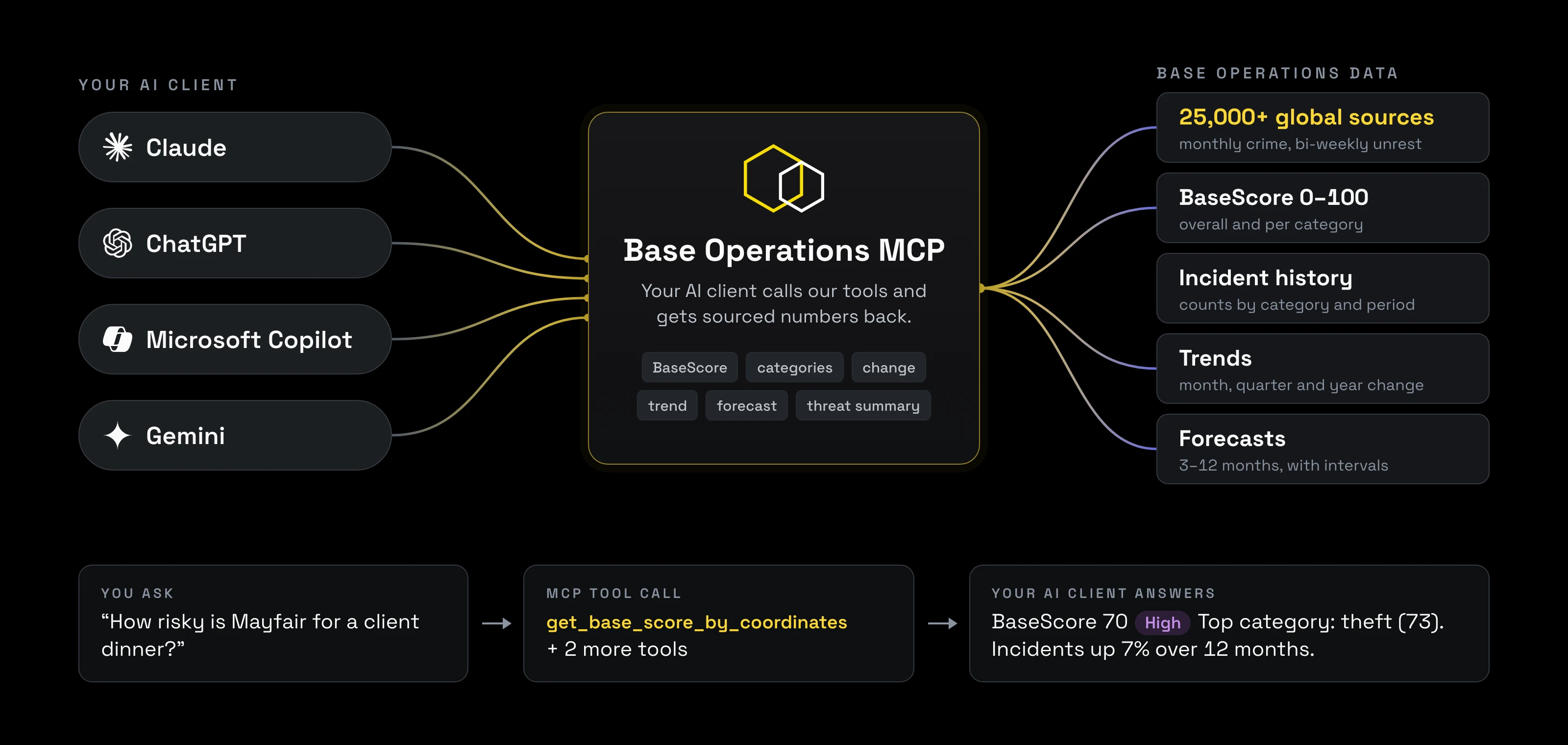
The Base Operations MCP connects your team's approved AI tool (Claude, ChatGPT, Microsoft Copilot, or Gemini) directly to our threat data. Ask a question in plain language and get an answer grounded in street-level data from 25,000+ global sources, ready to drop into an assessment, a brief, or a report.
For any address, coordinate, or radius, your AI tool can pull:
BaseScore (0–100)
Overall and by threat category.
Incident breakdowns
By category and subcategory.
Monthly history
30-day rolling averages and period-over-period change.
What drove a change
The categories behind every rise or fall.
Forecasts
Forward-looking forecasts of emerging risk.
Trends
By threat category and date type.

From short prompt to polished report.
Design partners get our library of security skills: pre-built workflows that turn a one-line request into a deliverable your team can review and send.
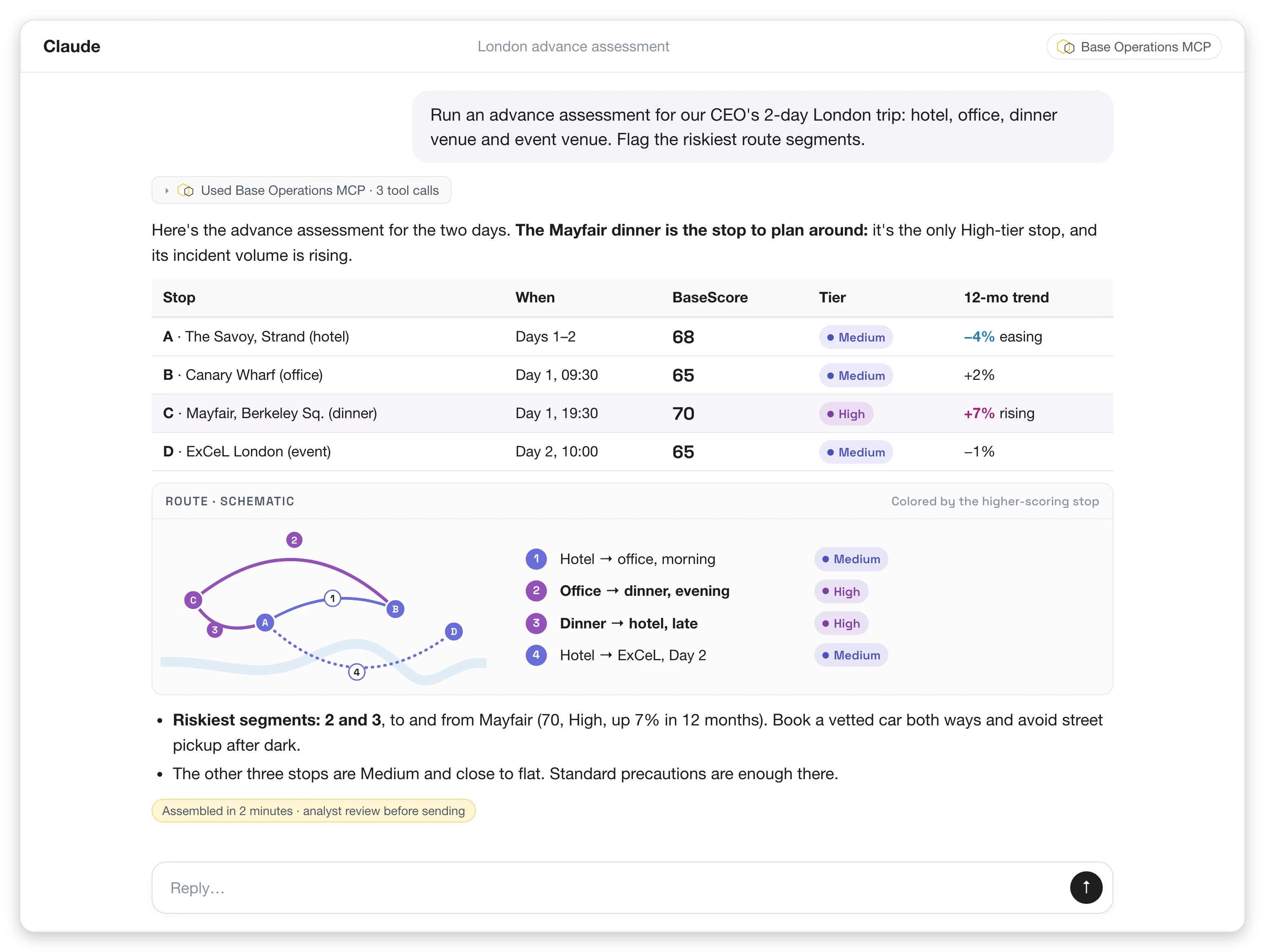
A 2-day itinerary, scored and route-analyzed in minutes.
Four stops across two days. Your AI tool pulls BaseScore, category scores, and 24 months of trends for every stop, maps the higher-risk route segments, and drafts the brief in your team's format. What took an analyst a day takes minutes. The analyst still reviews it and adds judgment.
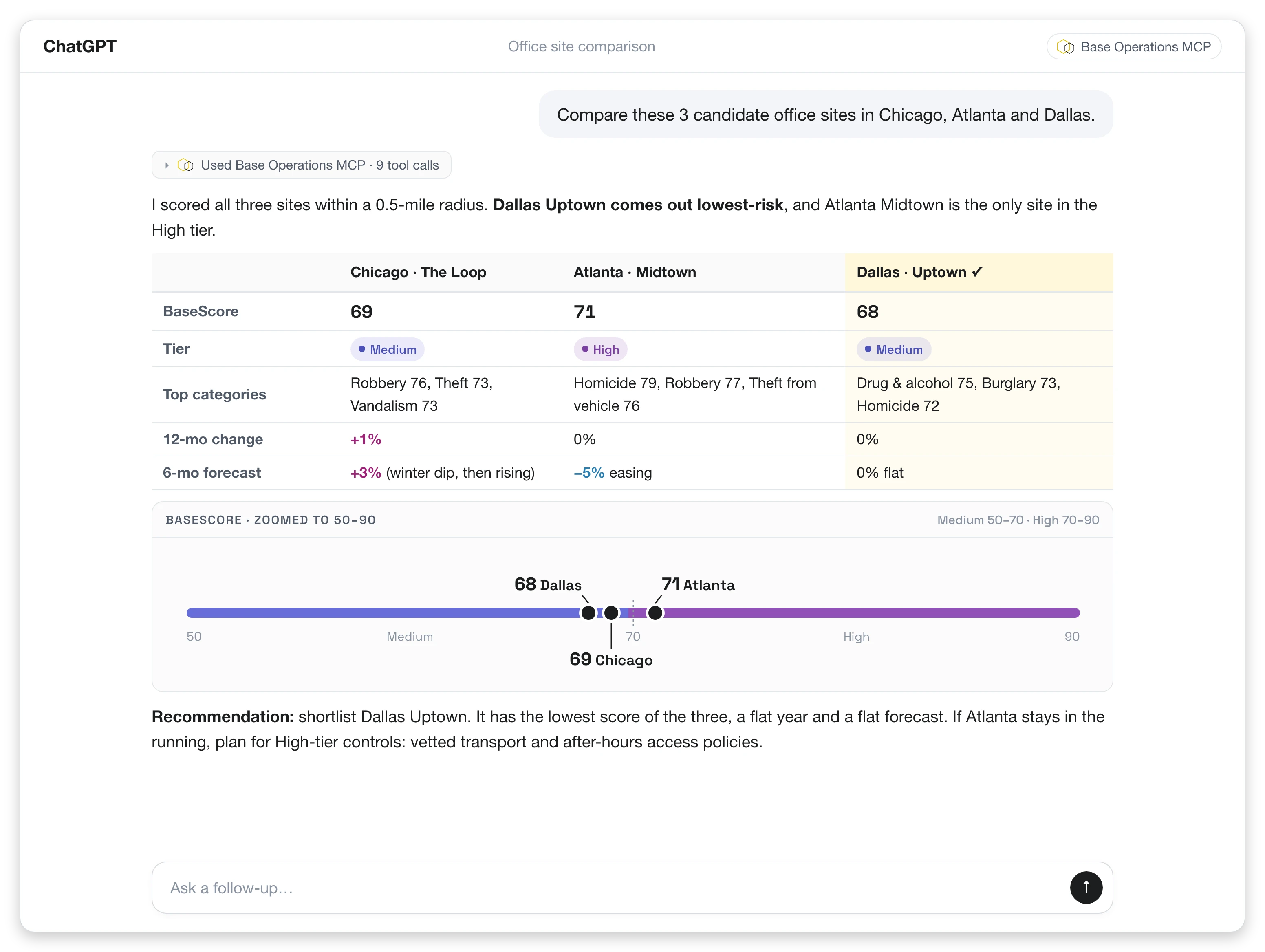
Compare candidate sites side by side.
Put 2–5 locations next to each other on BaseScore, top threat categories, 12-month change, and forecast direction. Use it for site selection, expansion planning, or deciding where security spend goes first.
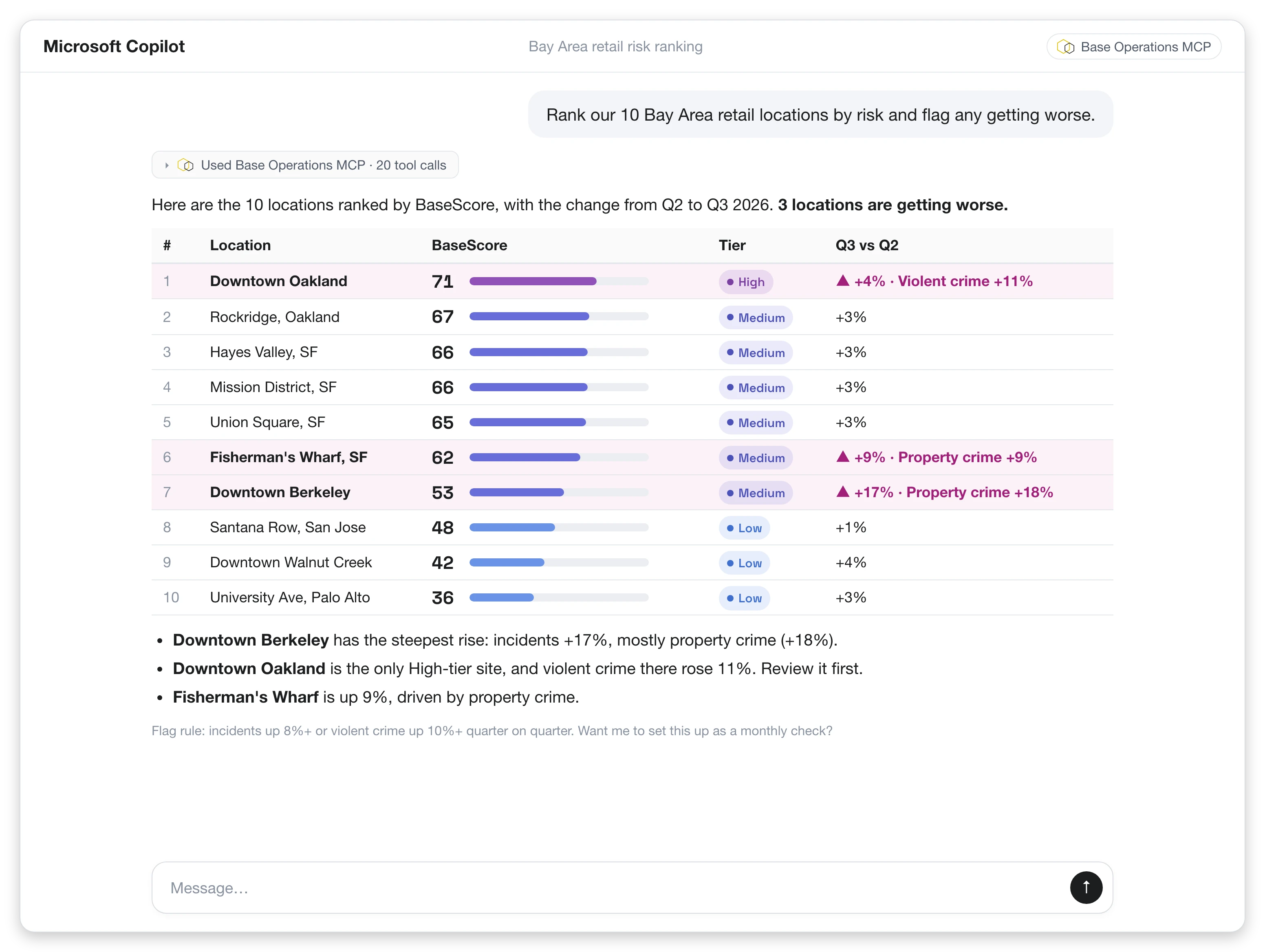
Rank your whole portfolio and see what's getting worse.
Score every saved location in one run, rank them by risk, and flag the sites where risk is rising, with the category driving the change.
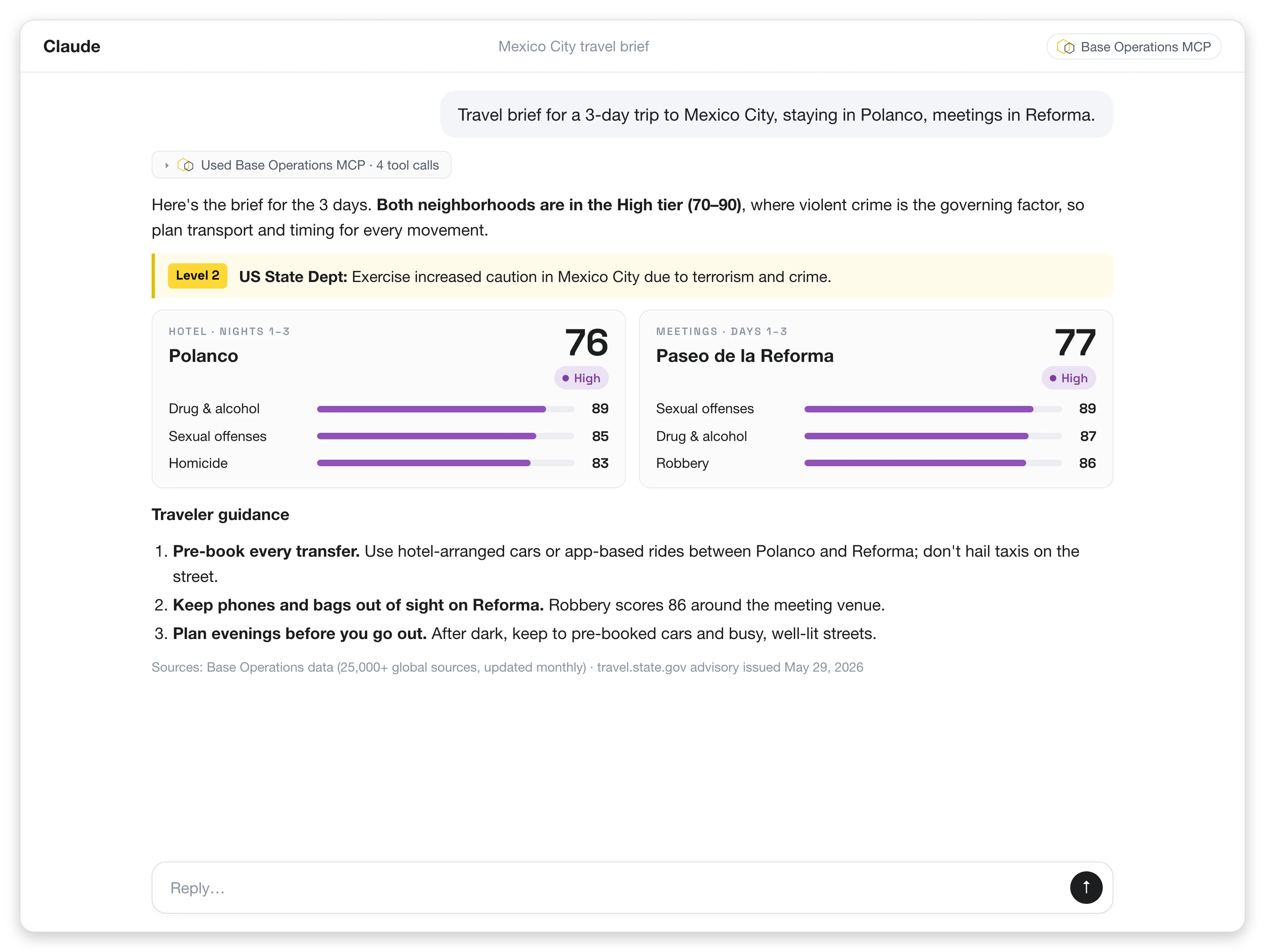
Travel briefs for specific addresses, not generic city assessments.
Combine government travel advisories with street-level BaseScore and threat categories for where your traveler will actually stay and work.

Eight skills included, adapted to your workflows.
Threat check
Address in; BaseScore, risk tier, and threat summary out.
Site assessment
Full threat assessment report for one location.
Site compare
2–5 locations side by side.
Portfolio analysis
Ranks saved locations by risk and flags rising trends.
Event security
Venue-focused pre-event assessment.
Advance assessment
EP-focused analysis for detailed pre-trip planning.
Route analysis
Maps higher- and lower-risk sections of key routes.
Travel brief
BaseScore plus government advisories and traveler-specific risk.
Custom skills
Built for up to three of your own workflows.
Build it with us in 2027.
What you get
- Base Operations MCP access for your team's approved AI client
- The full security skills library
- Hands-on setup: we connect the MCP, install the skills, and adapt them to your templates, risk thresholds, and reporting formats
- Custom skills built for up to three of your workflows
- Direct input on the 2027 MCP and skills roadmap
- A named Base Operations contact and a monthly working session
What we ask
- A monthly feedback session and access to usage findings
- Permission to reference you as a design partner
- One case study, if the results support it
Get for a 12-month license at a design partner rate. Pricing on call.
Built for security teams already using AI.
Security and intelligence teams
Corporate security, intelligence, GSOC, executive protection, and travel security teams.
Already working with AI
Using an approved AI client (Claude, ChatGPT, Microsoft Copilot, Gemini) or piloting one.
Location risk drives decisions
A global or multi-site footprint where location risk drives real decisions.
FAQs
Common questions about the MCP design partner program.
Apply to be a design partner.
Four spots available. Applications close Dec 19 2026.
What happens next
- We review your application within 2 business days.
- A 30-minute fit call with our team.
- Contracts and setup start in January.